How to create a new form?
This is a common question from Google Workspace users who need a form for the first time and do not know where to start. A link to Google Forms is not always at hand and if you are already working in Drive or keeping your data in a spreadsheet, you do not want to leave it just to create one. Google lets you create a form for free from Google Forms, Google Drive or Google Sheets, but each of them gives you a form with Google's look. With Formfacade, you can create a form with your own branding instead of Google's. Even better, the responses will be collected on your Google Forms, so you can sync them to Google Sheets and share them with your team.
Let's start. Create your form with Formfacade or use one of the three ways below.
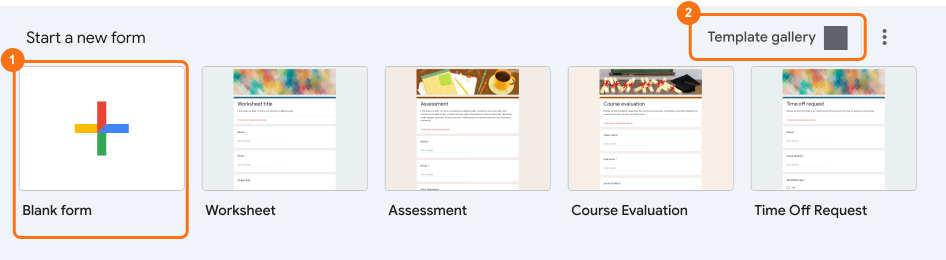
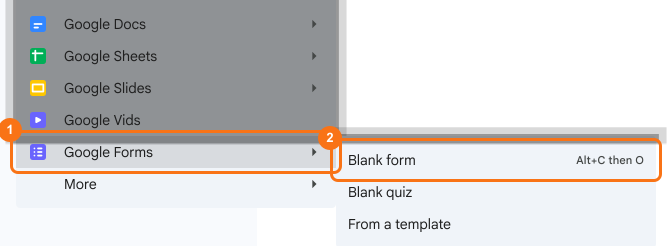
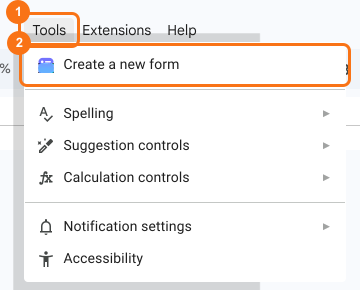
There are three ways to create a new form. [1] You can create a new form by choosing either a blank form or an existing template in Google Forms. [2] You can create a new form directly from Google Drive. [3] You can create a new form using Tools > Create a new form menu option in Google Sheets.
Create a Google Form
- Go to forms.google.com
- Click on + Blank form or an existing template
Create a form from Google Drive
- Go to drive.google.com
- Right click or click on + New button, select Google Forms and click Blank form
Create a form in Google Sheets
- Go to sheets.google.com
- Open an existing spreadsheet or create a new spreadsheet
- Click Tools > Create a new form
Summary
If you need a new form, you do not have to start from the Google Forms home page. You can create it in Google Forms, in Google Drive using the + New button or in Google Sheets using Tools > Create a new form. You can also create your form with Formfacade.
Last updated: