Can I add a file upload option in my forms?
"Does Formfacade allow google form to accept file upload without signing in."- Support forum
This is a common question from Google Forms users who embed their form in their website. The file upload question in Google Forms makes your users sign in to a Google account to upload their file. If they do not have one, they cannot submit the form and you lose that response. Yes, with Formfacade, you can add a file upload question and your users can upload a file and submit the form without signing in. Even better, you can open each response on your Kanban board and view or download the file from there.
Let's start. Create your form and follow the steps below.
What's the difference between Google file upload and Formfacade HTML file upload?
Google Form's file upload question requires your users to be signed in to a Google account to upload their file and submit their response. The files are uploaded to the form creator's Google Drive.
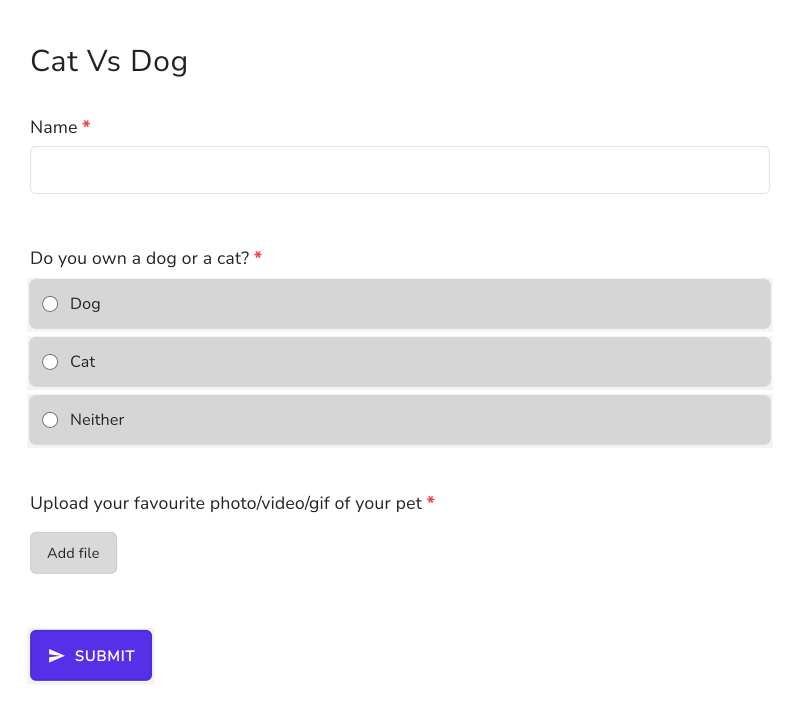
In Formfacade, the users will be able to upload a file using the Add file link and submit the form without having to sign in with a Google account.
Adding a file upload question
- On the page that opens, name your form, click Build form and click Proceed. It can take about a minute.
- You will land on the form's "Preview" tab.
- Click on "Edit" tab

- Click on the + icon (Add field) in the toolbar on the right. A new question will be added.
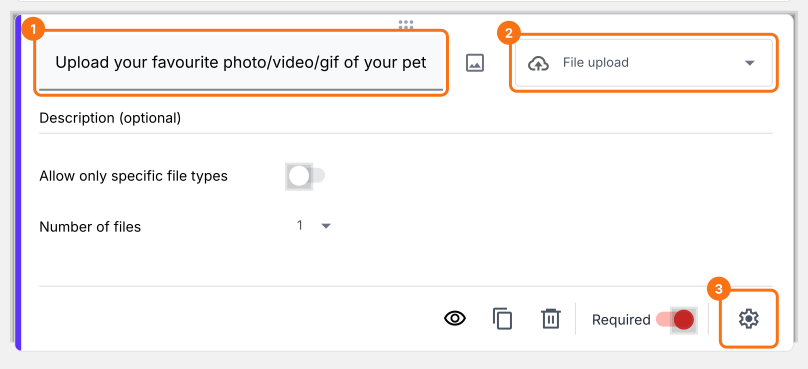
- Enter "Upload your favourite photo/video/gif of your pet" as the question and select File upload in the question type list
- If required, make it as a mandatory question

To let your users upload multiple files, click on the ⚙️ icon at the bottom right of the question, select the "Answer" tab and set the Maximum number of files. Click Save.
Using Formfacade form to collect responses
Form with the HTML file upload option as displayed to the users. Users can upload a file using this file upload option.
Viewing form responses with file upload questions
- Click on "Responses" tab
- Click on Kanban board, then click on the response
- The name of the uploaded file will be shown as a response to that question. You can click on it to view and download the file.

Summary
If your users do not have a Google account, they cannot use the file upload question in Google Forms. With Formfacade, you can add a file upload question and your users can upload a file and submit the form without signing in. Create your form and complete the steps above.
Last updated: