Frequency scale
This is a common question from people who want to know how often users use their product or do a certain task. You need the same answers for every item so that you can compare them. Google Forms has no question type for this. Adding a separate multiple choice question for each item makes the form long and tiring to fill. With Formfacade, you can create it with a multiple choice grid in the form's "Edit" tab and your users will see one table with the items in rows and the frequency in columns. Even better, you can sync the responses to Google Sheets and compare the items with your team.
Let's start. Create your form and follow the steps below.
Frequency scale questions can be used to understand how often users use a product or perform a certain action. You can create frequency scale question using the multiple choice grid question type. Here's an example below.
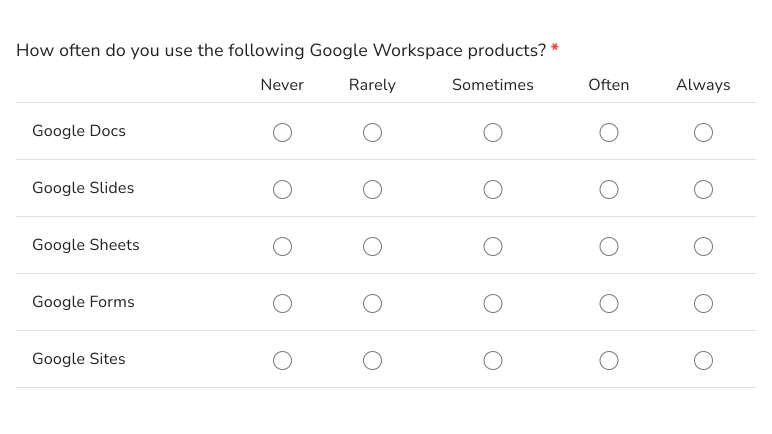
How to create a frequency scale question?
- On the page that opens, name your form, click Build form and click Proceed. It can take about a minute.
- You will land on the form's "Preview" tab.
- Click on "Edit" tab

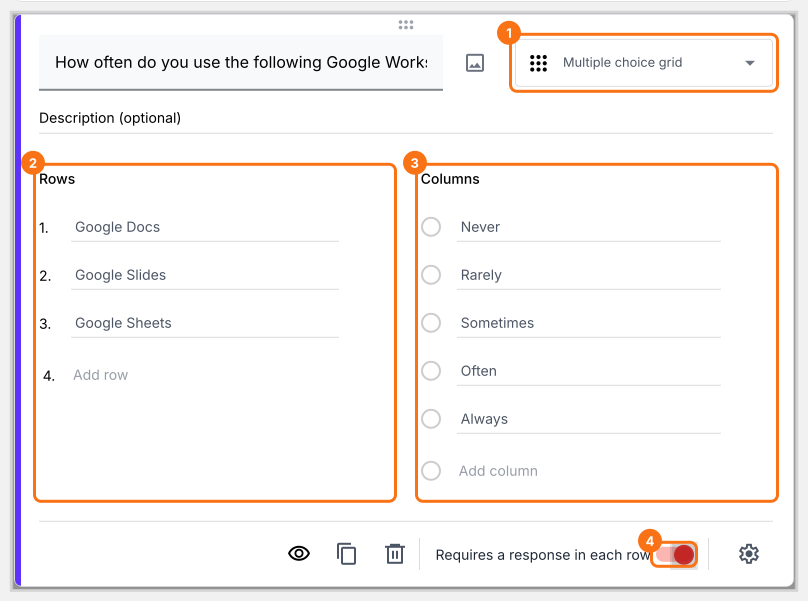
Google Forms does not have a separate question type for frequency scale. You can use a multiple choice grid with require a response in each row option enabled to create a frequency scale.
- Click on the + icon (Add field) in the toolbar on the right and enter your question
- Select Multiple choice grid in the question type list
- Add statements or questions in Rows
- Add frequency scale as answer choices in Columns
- Enable Requires a response in each row toggle button as shown below
Summary
If you want to measure how often users do something, Google Forms does not have a frequency scale question. With a multiple choice grid in Formfacade, you add the items as rows and the frequency scale as columns and you can require a response in each row. Create your form and complete the steps above.
Last updated: