How to allow collaborators to edit google forms responses after submit?
"open a submitted form and edit the submitted form as the owner"- Google Docs Editors Community
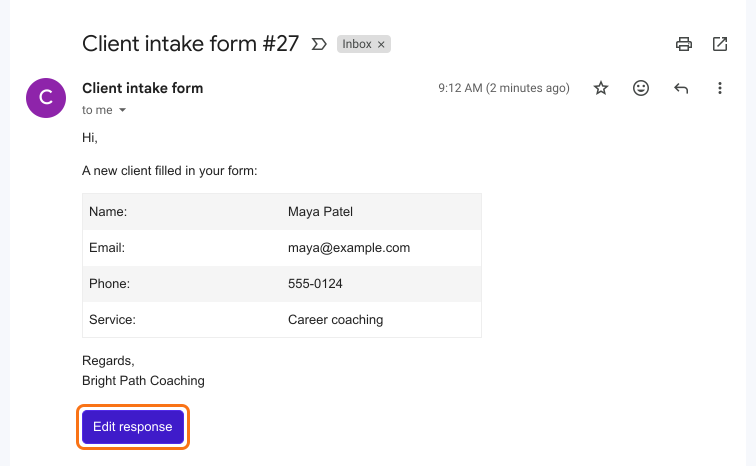
This is a common question from Google Workspace users who check forms after they come in. For example, you might run a client intake form and your team finds wrong phone numbers and misspelled names. Google Forms can let the person who filled in the form edit their own answer, but it does not let your collaborators change it. You can correct the linked Google Sheet, but the answer in the form stays wrong. With Formfacade, you can enable the edit response option when configuring the email notifications for collaborators. Your collaborators will get an edit response button in the email and can correct the answer from there. Even better, the answers are in the email itself, so your team can spot the mistake without opening the form.
Let's start. Create your form and follow the steps below.
How to enable the edit response option for collaborators?
- On the page that opens, name your form, click Create form and click Proceed.
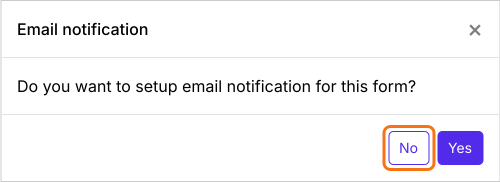
- You will land on the form's "Edit" tab, with the "Email notification" dialog open. It asks "Do you want to setup email notification for this form?". Click No.
- Click on "Responses" tab

- Click Kanban board
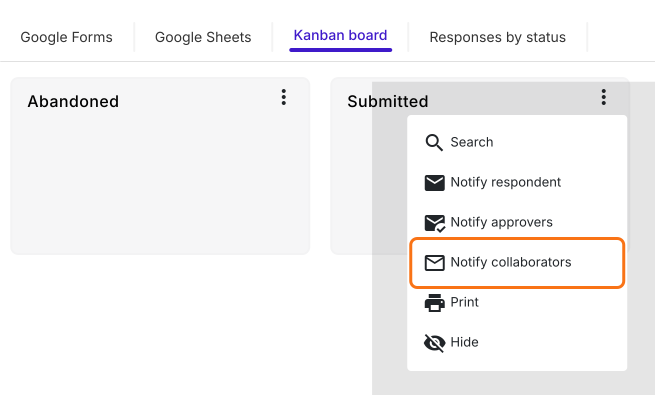
- Click on the three dots ⋮ on Submitted
- Click Notify collaborators
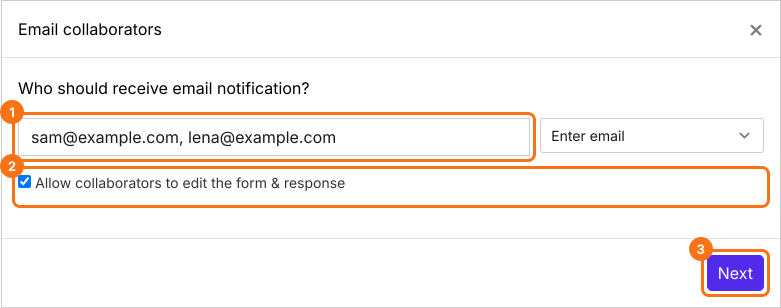
- Email notifications setup wizard will be displayed
- Enter the email address or a list of email addresses separated by a comma, keep Allow collaborators to edit the form & response option ticked and click Next
- Enter the email subject and click Next
- Enter the email content/message and click Next
- Click on "Click here" to open your form in a new tab. Fill it and submit it. If you receive the email, click on the YES button to complete email notifications setup
How can collaborators edit google forms responses after submit?
Summary
Last updated: