Only the help option is displayed in the Formfacade add-on menu. How can I fix this?
This is a common question from people who use the Formfacade add-on in Google Forms. If you open the add-on as soon as your Google Form opens, you may find a menu with nothing to click except Help. You wanted to embed or customize your form and the options you were told about are not there. It looks as if the add-on did not install properly. This is a Google Workspace issue. To fix it, click on the add-on icon a couple of mins after opening your Google Form.
Google Workspace issue: Menu doesn't load properly; only the Help option is displayed in the menu when the Formfacade add-on is selected immediately after opening the Google Form.
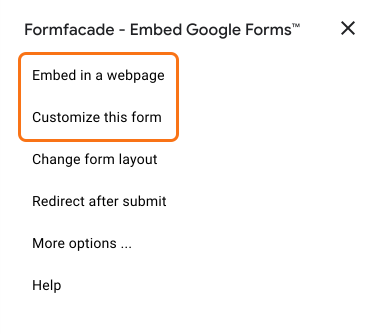
Click on the add-on icon a couple of mins after opening your Google Form (once your Google Form is loaded), Embed in a webpage and Customize this form option will be displayed in the menu.
Summary
If only the Help option is displayed when you open the add-on, your Google Form has not finished loading. You wait a couple of mins and click on the add-on icon again, and Embed in a webpage and Customize this form will be displayed. If you have any questions, write to support.
Last updated: