How to add signature in Google Sheets?

This is a common question from Google Sheets users whose timesheets or expense logs need someone to sign off. Google Sheets does not have a built-in esignature feature similar to Google Docs, but you can use the Insert image, Drawing in Google Sheets or use addons to add signatures in Google Sheets. An image or a drawing is not legally binding and does not work well for signature workflows. With Formesign, you can add a signature field to the sheet and collect a signed PDF. Even better, you can define the signing order.
Let's start. Connect your Google Sheet and follow the steps below.
Google Sheets offers multiple ways to insert signatures, making it easy to sign or request approvals without leaving the document. Here are the three main options:
- Upload a Signature Image
- Use the Scribble Tool via Insert > Drawing
- Use Google Workspace Addons (Formesign - Signature for Google Sheets, Docusign etc)
While Google Docs is great for text-based documents such as agreements, contracts, and Google Forms excels at collecting responses, Google Sheets is uniquely designed for organizing data in table format, making it the perfect tool to record approvals directly within the data itself.
For example, project managers sign off on task lists, finance teams approve expense logs, procurement teams manage purchase request approval workflows and more.
Upload a Signature Image
If you already have a scanned or photographed signature, then you can upload this signature image.
- Open Google Sheets
- In Google Sheets, click Insert > click Image > click Insert image over cells
- Upload your signature image
- Resize and position it as needed
✅ Pros
- Easy to use
- Looks like a real signature
❌ Cons
- Not legally binding
- Does not work well for signature workflows
- Limited tracking & analytics
Use the Scribble Tool via Insert > Drawing
You can use the Drawing feature in Google Sheets to add hand drawn signature in your Google Sheets.
- Open Google Sheets
- In Google Sheets, click Insert > click Drawing
- Click Line and select Scribble tool
- Use your mouse or trackpad to draw your signature
- Click Save and Close
- Resize and position it as needed
✅ Pros
- No external tools needed
- Looks like a real signature
❌ Cons
- Not legally binding
- Might be hard to draw
- Does not work well for signature workflows
- Limited tracking & analytics
Use Formesign - Signature for Google Sheets add-on
If you need to collect legally binding signatures in Google Sheets, you can use the Formesign - Sheet signature addon. This addon allows you to add signatures, define signing order and set up a signature workflow directly inside Google Sheets.
- Click on Connect your Google Sheet, paste your Google Sheets link and click Add signature
- Click Next on Let's connect your sheet, pick your sheet in Google Drive and allow access
- Choose the tab to sign and add the signer. Formesign adds a signature field to the sheet and saves a signed PDF to Drive when the signer signs
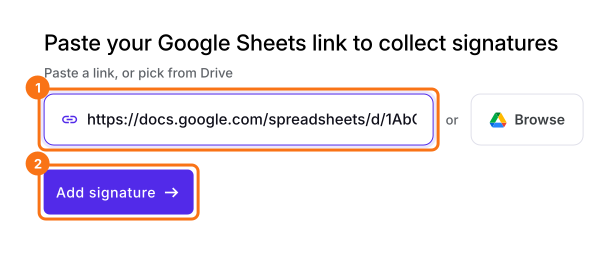
You can also start from the addon, once it is installed:
- Open Google Sheets
- click Extensions > click Formesign - Signature for Google Sheets
- click Request signature > select Email, click Next
- enter the approval steps
- enter the email address of the approvers and click Request signature
✅ Pros
- Secure and legally compliant (ESIGN Act, eIDAS)
- User-friendly and intuitive interface
- Seamless integration with Google Drive
- Supports multiple signers and approval workflows
❌ Cons
- Requires users to install the addon
Summary
If someone has to sign off on a Google Sheet, an image or a drawing is not legally binding and does not work well for signature workflows. With Formesign, you add a signature to your sheet, define signing order and collect signed PDFs. Connect your Google Sheet and complete the steps above. If you have any questions, write to support.
Last updated: