How automated form scheduling helps teams collect signatures 10x faster
"Sending Reminders to selected people"- Google Docs Editors Community
This is a common question from Google Forms users who chase forms. For example, you send the same signature form every day and you also have to remind the people who did not sign. A Google Form cannot send itself on a schedule or remind anyone. So you email it by hand, track who signed in a spreadsheet and write the reminders yourself. With Formesign, forms send themselves on your schedule and reminders go out automatically. Even better, data populates instantly, so people sign faster with fewer errors. Stop chasing signatures. Start automating compliance.
Let's start. Create your form to set this up.
Every morning, Sarah sends the same safety inspection form to her team. Every afternoon, she sends reminder emails to those who forgot to sign. Every week, she spends 5+ hours on this repetitive task alone.
Sound familiar? You're not alone. 67% of operations managers report that manual signature collection drains their productivity and delays compliance reporting.
What if your Google Forms could send themselves? What if reminders went out automatically? What if every form arrived pre-filled with the right information?
With Formesign's Scheduler, Reminder and Prefill features, this isn't wishful thinking. It's your new workflow.
The hidden cost of manual signature collection
You've built the perfect Google Form. Your inspection checklist covers every safety requirement. Your liability waiver protects your organization. Your consent form meets every compliance standard.
But here's where things break down:
- You manually email the form every single day
- You track who signed and who didn't in a separate spreadsheet
- You send awkward reminder emails to non-responders
- You re-enter the same information into forms repeatedly
5.2 hours/week Average time spent on manual signature collection tasks
That's over 270 hours per year, nearly seven full work weeks, spent on tasks a computer can handle in seconds.
Worse, manual processes introduce errors. Forms go unsent. Reminders get forgotten. Compliance deadlines slip. And when auditors come knocking, you're scrambling to piece together records from email threads and scattered spreadsheets.
The solution: automated signature workflows
Formesign transforms Google Forms into a complete automated signature collection system. Three powerful features work together to eliminate manual work:
| Scheduler | Automatically send signature requests daily, weekly or monthly |
| Reminders | Send automatic follow-ups to anyone who hasn't signed, no manual tracking required |
| Prefill | Pre-populate form fields with recipient information so signing takes seconds |
Together, these features create a "set it and forget it" signature workflow that runs on autopilot while you focus on higher-value work.
Feature deep-dive: your complete automation toolkit
📅 Scheduler: send forms automatically on your schedule
Stop starting every morning with "send the daily form." The Scheduler delivers signature requests exactly when you need them, without you lifting a finger.
Go to Formesign dashboard -> Select the form -> Click on "Share" -> Click on "Schedule emails". Schedule emails is on forms with a signature workflow, which is what the link on this page makes.
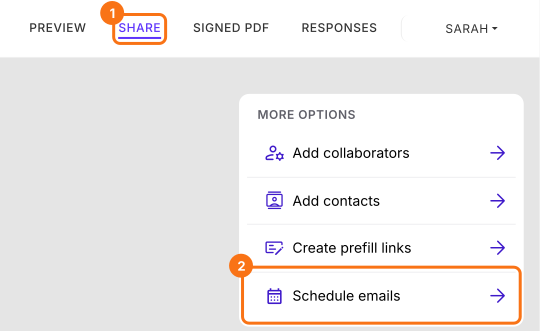
How it works:
- On the Schedule emails page, click "Schedule"
- Choose One schedule at a time or Bulk schedule and click Next
- Add recipients: enter the email for each approver
- Click Advanced and turn on Repeat schedule, then choose Daily, Weekly or Monthly and your preferred send time (forms send in your local timezone). Repeat schedule needs a paid plan of Formesign
- Click "Send email" and walk away. Formesign handles the rest. With Repeat schedule on, this button says "Schedule email"
Why this matters: You eliminate the risk of forgetting to send forms. Every inspection, every waiver, every consent form goes out on time, every time. Your audit trail builds itself.
🔔 Reminder emails: automatic follow-ups that get results
Nobody likes sending "just checking in" emails. And nobody likes receiving them either. Automated reminders solve this by sending polite, professional follow-ups only to people who haven't signed.
How it works:
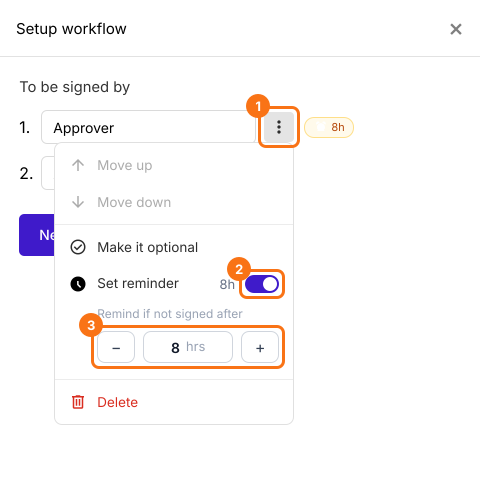
- Click the pencil on the Signature workflow card, click the three dots beside the approver, switch on Set reminder and set reminder timing for that approver (e.g., 4 hours, 24 hours, 48 hours)
- Customize reminder frequency based on urgency level
- Reminders automatically stop once the signature is collected
- The Reminder emails switch under Advanced, in the Email tab and in the Schedule email box, needs a paid plan of Formesign
73% fasterSignature completion rate with automated reminders vs. manual follow-ups
Why this matters: You stop playing email tag. Reminders go out at the optimal time and you never have to manually track who signed and who didn't. Your completion rates improve without any extra effort.
✨ Prefill form data: faster signing, fewer errors
Why make signers type information you already have? Prefill populates form fields automatically, like names, emails, dates and department info, so recipients can review and sign in seconds.
Two ways to prefill:
Fill Manually: Enter data directly through a simple form interface
Upload Document: Upload a PDF or document and Formesign automatically extracts the data to prefill your form. No manual copy-paste required
Why this matters: You reduce friction for signers and eliminate data entry errors. Forms that took minutes to complete now take seconds. And when data is pre-populated, you get cleaner, more consistent records.
Stop chasing signatures. Start automating.
Manual signature collection isn't just tedious. It's a liability. Missed forms, forgotten follow-ups and inconsistent records create compliance gaps that put your organization at risk.
With Formesign's Scheduler, Reminder and Prefill features, you transform Google Forms into a powerful automated signature system. Forms send themselves. Reminders go out automatically. Data populates instantly. And you get complete, audit-ready records without the manual work.
Join 700+ organizations that have already used Formesign to collect signatures. Your first automated form is just five minutes away.
Summary
If you send the same form every day and chase the people who have not signed, a Google Form cannot do this for you. With Formesign, forms send themselves on your schedule, reminders go out automatically and data populates instantly. Create your form to set this up.
Last updated: