How to download google forms responses?
This is a common question from people who work on their form responses in Excel or another tool. You cannot work with them on the Responses tab and copying the answers by hand one at a time is slow and easy to get wrong. Google Forms lets you download them as a .csv file from the More menu, but that file is out of date by the next response. With Formfacade, you can open your responses in Google Forms from the Responses tab and download them as a .csv file. Even better, you can sync the same responses to Google Sheets and share them with your team, so nobody has to wait for your file.
Let's start. Create your form and follow the steps below.
How to get your responses into Google Forms?
- On the page that opens, name your form, click Embed form and click Proceed. It can take about a minute.
- You will land on the form's "Share" tab, on Embed. The top bar may say "Blank Formfacade form" until you reload the page.
- Click on "Responses" tab

- Click Submit to Google Forms
- "Submit responses to Google Forms?" popup will be displayed. Click Proceed

If the button already says View in Google Forms, your responses are already going to Google Forms. Only the responses submitted after you click Proceed will reach Google Forms.
- Click on "Share" tab

- Click Link, then click Open to open your form
- Fill the form and submit it, so that you have a response to see
How to download the responses?
- Click on "Responses" tab
- Click View in Google Forms. Your form's responses will open in Google Forms

- Click More ⋮ icon
- Click Download responses (.csv)
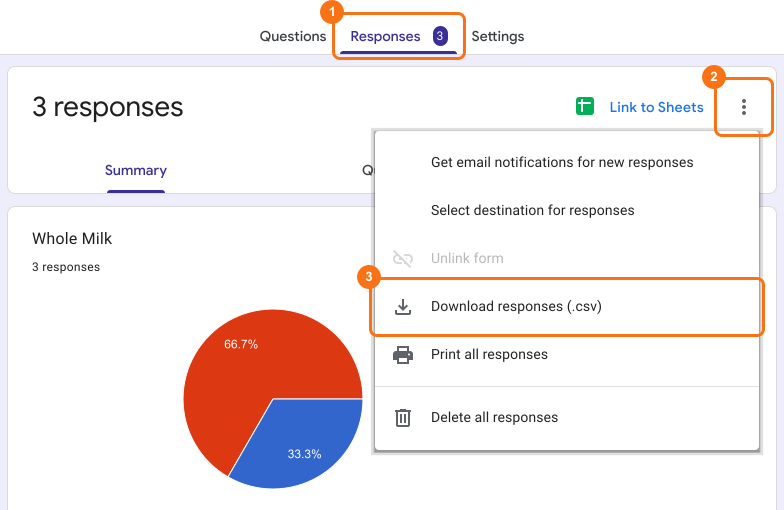
You get all the responses as a .csv file.
Summary
If you need your responses outside Google Forms, copying them by hand is slow. With Formfacade, you click Responses > View in Google Forms > More ⋮ icon > Download responses (.csv) and you get all the responses as a .csv file. Create your form and complete the steps above. If you have any questions, write to support.
Last updated: