How to send automatic signature reminders?
"I can't figure out how to send a "reminder" to ask him to sign"- Google Docs Editors Community
This is a common question: 192 people on Google's forum have asked how to remind someone who hasn't signed a document sent for eSignature in Google Docs. With purchase requests, the approval email can be deleted or sink in an inbox, and nothing tells you. Google Forms can't send a reminder, so you keep a list of who has what and write each follow-up yourself. In Formesign you set a reminder for an approver once, in hours. If they haven't signed by then, they get a new email with the signing link, even if they deleted the first one.
Let's start. Import your Google Form and follow the steps below.
1. Open the signer list
- Click on Import your Google Form. On the page that opens, paste your Google Form's link or click Browse to pick it and click Next.
- Under To be signed by, type over the first signer so that it reads Requester. Click Add new signer, type Approver and click Next.
- When it says Your signing link is ready, click Preview signing experience to try the form, then click Form editor under Manage.
- Click the pencil on the Signature workflow card.
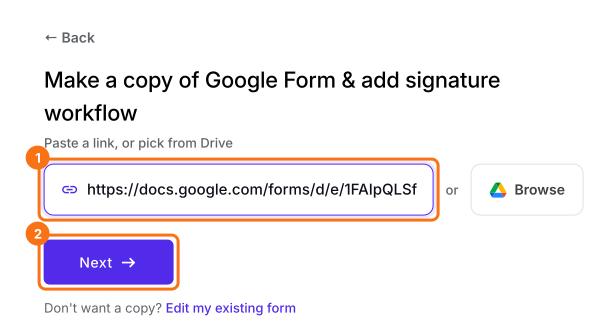
2. Turn on Set reminder
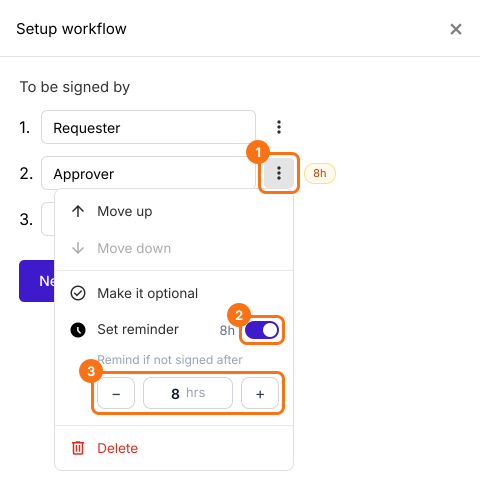
3. Share the link
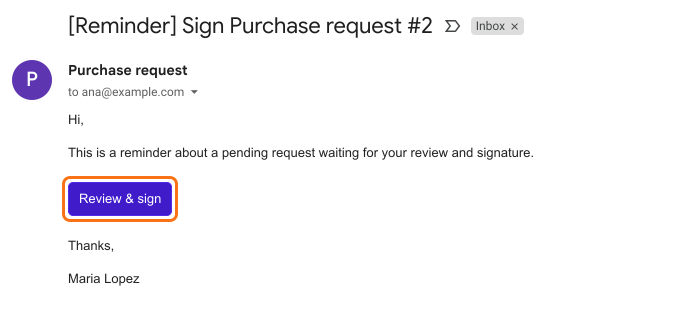
4. The approver gets the reminder
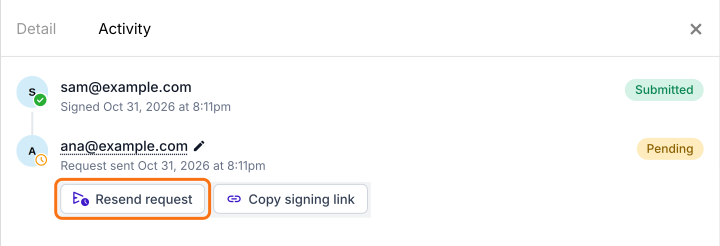
5. Send it again if you need to
Summary
Remind approvers who haven't signed your Google Form.
Import the Google Form that needs approval and switch on Set reminder. Anyone who hasn't signed in time gets the link again, even if they deleted the email.